You quote a fixed-price job, ask for half up front, and the client pays it. Good. Now there's a small bookkeeping question that turns out to be surprisingly easy to get wrong: how do you bill that deposit, and how do you make sure the balance is still sitting somewhere you'll see it in six weeks?
It's an old question. A thread on Freelancing Stack Exchange asks which software can do partial or instalment invoicing, from someone who'd tried three well-known tools and found no clean way to do it. It's been read more than 3,000 times. Two smaller threads ask the questions around it: is it normal to demand a deposit at all, and what to do when a client paid the deposit and then disappeared.
The answer to the first one is yes, it's normal, and for a new client it's sensible. This article is about the paperwork.
Two ways to bill a deposit
One invoice, two payments. You issue a single invoice for the whole job, $2,000, and record each payment against it as it arrives: $1,000 now, $1,000 on delivery. The invoice is part-paid in between and paid at the end. There's one document, one number, and the balance is always the total minus what came in.
A deposit invoice, then a final invoice. You issue an invoice for the $1,000 deposit on its own. When the work is done, you issue a second invoice for the whole job that shows the deposit already received and asks for the remainder.
Neither is wrong. The simple rule:
- If the client needs a document to release the deposit (their accounts payable won't pay without an invoice number, or they're claiming VAT on it), use two invoices.
- Everyone else, use one. It's less to keep track of, and you can't end up with a deposit invoice that's "paid" and a job that nobody remembers was only half-billed.
As a rough guide, freelancers billing individuals and small businesses are usually in the second group, and anyone billing a large company is usually in the first.
If you use two invoices, the final one has to show its working
The common mistake is a final invoice that just says "Balance: $1,000". The client's bookkeeper sees a $1,000 invoice with nothing behind it and asks what it is for. Put the whole job on the page and subtract the deposit:
| Brand identity package | $2,000.00 |
| Less: deposit received 3 Nov 2026 (invoice #61) | −$1,000.00 |
| Balance due by 24 Nov 2026 | $1,000.00 |
Three things make that work. The full price is visible, so the final invoice makes sense on its own. The deposit carries its date and the number of the invoice it was paid against, so it can be matched. And the due date is a date, not "on completion", which is the phrase that turns into an argument.
If VAT or sales tax applies, check how your jurisdiction wants deposits treated before you send the first invoice. In some places the tax point for the deposit is the day it's paid, which means tax on the deposit invoice and only on the balance in the final one. That's a question for your own tax authority's guidance, not a blog post.
When is the deposit income?
It depends on how you keep your books.
Cash basis, which most individuals and many small businesses use in the US: income is counted when the money arrives. The deposit is income on the day it lands, and the balance is income on the day it lands. If the two straddle a year end, they fall in different years. That's normal.
Accrual basis: the deposit is money you've been paid for work you haven't done yet. Until you deliver, it's a liability (often called a customer deposit or deferred revenue), and it becomes income when the job is invoiced or the work is done, depending on your rules.
The trap is mixing the two. A cash-basis filer who books the deposit as income and then books the full final invoice as income has counted $1,000 twice. One invoice with two payments avoids that by construction, since there's only ever one $2,000 invoice to count.
Doing it in Mini Accountant
This is Mini Accountant's blog, so here's how the one-invoice method works in it, on a real $2,000 job.
You create the invoice for the full amount as usual. When the deposit arrives, open the invoice, tap Add Transaction, and enter the date and the amount. The exchange rate field matters only if the payment came in a different currency from the invoice; here it didn't.
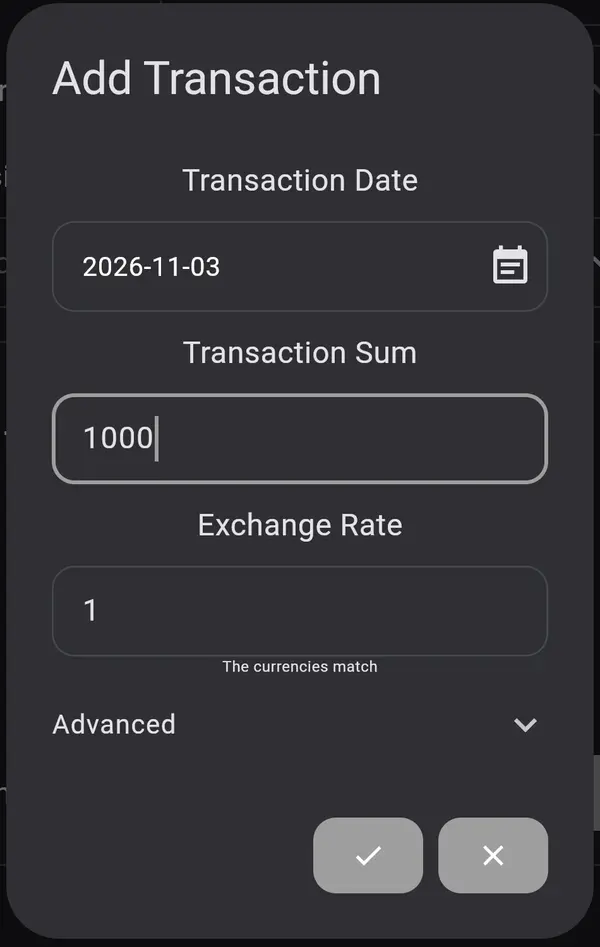
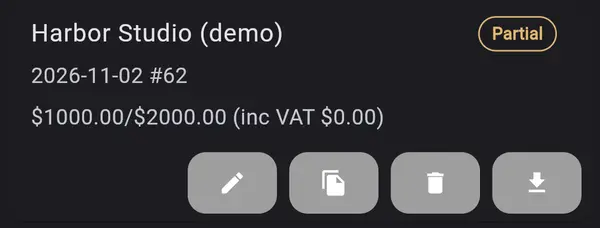
Save, and the invoice moves from Unpaid to Partial. The list shows what's been paid against the total, so the open balance is visible without opening anything:
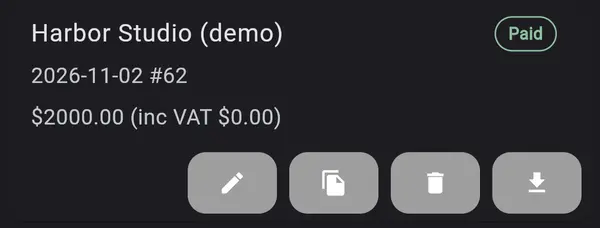
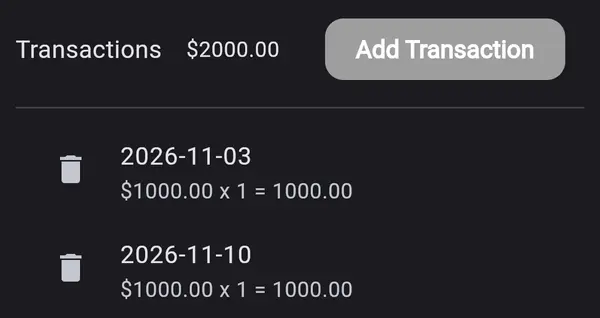
When the balance is paid, add the second transaction the same way. The invoice turns Paid, and both payments stay on it with their own dates:
If your client withheld tax from a payment, you record that with the payment too, and the reports count it as tax already paid. Every feature is free on iPhone, iPad, Android and the web; the optional Pro subscription removes the "Powered by Mini Accountant" line from invoices and reports.
Where it falls short
Two honest gaps, so you can decide before you try it:
- There's no "Balance due" label. The remainder shows as paid-of-total on the invoice card ($1000.00/$2000.00). That's clear enough to you, but if you want a printed invoice that says "Deposit received, balance due $1,000", you'd use the two-invoice method above.
- There's no instalment schedule. You can't set up "40% now, 30% at milestone two, 30% on delivery" with dates in advance. You ask for the deposit in your quote or your message, and record each payment as it arrives.
If a planned schedule is the main thing you need, other tools do it today. FreshBooks lets you request a deposit on an invoice as a percentage or flat amount, and the invoice shows "Deposit Paid" once it's settled; only one deposit per invoice. QuickBooks Online has progress invoicing, where you turn an accepted estimate into several partial invoices and track them in a summary report (both per their own help pages, November 2026; this kind of feature changes, so check before you decide).
And if you take a deposit twice a year, a spreadsheet with "paid" and "owed" columns is fine. The method matters more than the tool: one total, every payment dated, and the balance never left to memory.